


Laptop Fan Noising Too Much? Here’s What You Can Do | JustFix UAE
Introduction:
A noisy laptop fan is one of the most common issues users face—especially professionals, students, and gamers who rely on their laptops for long hours. When a laptop fan becomes unusually loud, it can be distracting, worrying, and a sign that something is wrong inside the machine. Understanding the root cause and taking the right steps at the right time can save your laptop from overheating, lagging, or even permanent hardware damage.
If you are based in Abu Dhabi, JustFix provides expert and affordable repair services to diagnose and fix loud laptop fan problems professionally. But before you rush for a repair, here is a complete guide on why your laptop fan makes too much noise—and what you can do to fix it.
Why Laptop Fans Become Noisy
Laptop fans are designed to keep the internal components cool. When something interferes with this cooling process, the fan compensates by spinning faster, which leads to noise. Some common causes include:
- Dust and Dirt Build-up
Over time, dust accumulates inside the laptop’s ventilation system. This blocks airflow, causing the fan to spin harder to cool down the system. If you have not cleaned your laptop internally for more than a year, dust is likely the main reason behind the loud noise.
- Overheating Due to High Workload
If you frequently run heavy software like video editing tools, graphic design programs, or games, your laptop generates more heat. In this case, the fan speed increases naturally, leading to more noise.
- Faulty or Damaged Fan
Sometimes, the fan itself becomes faulty due to wear and tear. A damaged fan blade or worn-out bearing can create grinding, rattling, or clicking sounds.
- Blocked Air Vents
Using your laptop on a bed, pillow, or couch can block the ventilation area. When air cannot flow properly, the system heats up immediately, causing the fan to run louder than usual.
- Malware or Background Tasks
Unwanted applications and malware running in the background increase CPU usage. High CPU temperature forces the fan to spin faster and noisier.
- Aging Thermal Paste
Thermal paste transfers heat from the processor to the heat sink. With time, it dries up and loses efficiency, causing the laptop to heat faster and forcing the fan to overwork.
What You Can Do to Fix a Noisy Laptop Fan
Before heading to a repair shop, try these steps that often solve the issue quickly and safely.
- Clean Your Laptop’s Air Vents
Use compressed air to blow out dust from the fan vents. This simple step can instantly reduce fan noise and improve airflow.
- Check for Background Applications
Open your task manager and close unnecessary applications. Also scan your laptop for malware using trusted antivirus software.
- Use Your Laptop on a Hard Surface
Always place your laptop on a desk or table to allow proper airflow. Use a cooling pad for even better performance.
- Update Your Operating System and Drivers
Outdated system drivers or BIOS can cause hardware miscommunication leading to overheating. Keeping updates installed ensures smoother performance.
- Adjust Power Settings
Switch to balanced or power saver mode if you aren’t doing heavy work. This lowers your CPU load and reduces fan activity.
- Replace Thermal Paste
If your laptop is a few years old, the thermal paste may need replacing. This is a technical task and should be handled by professionals.
- Get Professional Fan Cleaning or Replacement
If the noise persists even after cleaning vents and controlling workload, your laptop fan might be damaged. A quick inspection by a trained technician will identify whether a repair or replacement is needed.
How JustFix in Dubai & Abu Dhabi Helps Solve Noisy Laptop Fan Problems
JustFix is one of the leading device repair service providers in the UAE, known for transparent pricing, experienced technicians, and fast turnaround times. When it comes to noisy laptop fans, JustFix offers:
- Professional Laptop Fan Cleaning
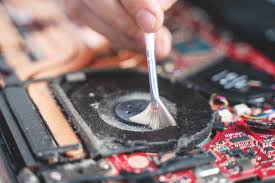
Our technicians carefully open the device, remove internal dust, clean the heat sink, and restore the original cooling efficiency.
- Complete Thermal Paste Replacement
We use high-quality thermal paste to improve heat transfer, reduce CPU temperature, and stabilize fan speed.
- Fan Repair & Replacement
If your fan is damaged or failing, JustFix provides genuine replacement parts for all laptop brands, including HP, Dell, Lenovo, Acer, Asus, Apple, MSI, and more.
- Overheating Diagnostics
We inspect the laptop’s processor, GPU, battery, motherboard, and cooling system to identify the root cause of excessive heat and noise.
- On-Site and Quick Service in UAE
Whether you are in Dubai or Abu Dhabi, JustFix offers convenient pickup, drop-off, in-store repairs, and even doorstep repair options depending on your device.
- Affordable Pricing
JustFix services are designed to be budget-friendly while maintaining high standards of quality and expertise.
When Should You Seek Professional Help?
You should visit JustFix if:
- Your fan continues to make noise even after cleaning.
- The laptop becomes hot within a few minutes of usage.
- You hear grinding, rattling, or clicking sounds.
- Performance slows down due to overheating.
- The laptop shuts down unexpectedly.
Ignoring these symptoms can lead to expensive motherboard or processor damage. Timely repair saves both time and money.
Final Thoughts
A noisy laptop fan is not just irritating—it’s a warning sign that your device is under stress. With the right steps and timely maintenance, you can bring your laptop back to normal performance. If you’re in Abu Dhabi or Dubai, JustFix is always ready to help with expert diagnostics, professional fan repair, cleaning services, and thermal paste replacement.
Taking action early protects your laptop’s life, performance, and safety. You can check our ducting cleaning solution.